
CheckMark Knowledge Base CheckMark Knowledge Base

  • PRODUCTS
    • ONLINE SOFTWARE
      • CheckMark Online Payroll
      • CheckMark Online 1099
      • CheckMark Online 1095
    • DESKTOP SOFTWARE
      • CheckMark Payroll Software
      • CheckMark MultiLedger
      • CheckMark 1099 Software
      • CheckMark 1095 Software
    • SERVICES
      • HR Services
      • Time & Attendance
    • PAPER PRODUCTS
      • Checks & Envelopes
      • Business Forms
      • Tax Forms
    • ADD-ONS
      • CheckMark Cloud Backup
  • STORE
    • Online Store Home
    • Software
    • Software Updates
    • Bundles
    • Checks & Envelopes
    • Business-Forms
    • Tax Forms
    • HR Support
  • MORE
    • ABOUT COMPANY
      • Our Story
      • Culture
      • Contact Us
    • PARTNER PROGRAMS
      • Consultant Program
      • Software Partner
      • Resellers Program
    • SUPPORT
      • Request Support
      • Knowledgebase
      • Blog
      • Tutorials
      • Find a Consultant
  • Sign In
    • My Account
    • 2026 Updates Portal
    • ONLINE SOLUTIONS
      • Employer Login
      • Employee Login
    • OTHER LOGINS
      • HR Services
      • Time & Attendance
  • Free Trial
Home / CheckMark 1099, Exporting and Importing / How to Export Companies from CheckMark Payroll

How to Export Companies from CheckMark Payroll

exporting companies from checkmark payroll

Exporting Companies From CheckMark Payroll

  1. Open CheckMark Payroll, then open the Company you wish to export.
  2. Under the File menu select Export Company to 1099.
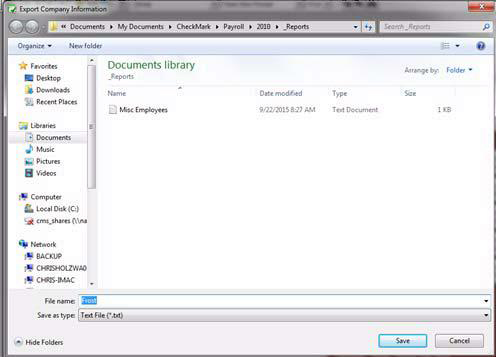
  3. A Save dialogue box appears. In the File name field, give the file a name if needed and choose a location to save the file to, an example would be your Desktop.
35

  1. Click Save.

Related Articles

How to Export Recipients from CheckMark Payroll

How to Export Recipients from CheckMark MultiLedger

How to Import Recipients from CheckMark Payroll and MultiLedger

How to Import a Company from CheckMark Payroll

How to Import Data Using Tab-Delimited Text File in CheckMark 1099 Software

Related

CheckMark 1099Exporting and Importing

Search the Knowledge Base

Browse by Topics

  • Getting Started
  • Creating a New Company
  • Installation and Basic Use
  • Set Up
  • Setting Up Recipients
  • Exporting and Importing
  • Printing 1099 Forms
  • eFile
  • Backup and Restore
  • Miscellaneous
109 software

ONLINE SOFTWARE

  • CheckMark Online Payroll
  • CheckMark Online 1099
  • CheckMark Online 1095

DESKTOP SOFTWARE

  • CheckMark Payroll Software
  • CheckMark MultiLedger
  • CheckMark 1099 Software
  • CheckMark 1095 Software

SERVICES

  • HR Services
  • Time & Attendance

PAPER PRODUCTS

  • Checks and Envelopes
  • Business Forms
  • Tax Forms

ABOUT US

  • Our Story
  • Consultant Program
  • Software Partner
  • Resellers Program
  • Contact Us

RESOURCES

  • Knowledge Base
  • Blog

CONTACT INFORMATION

  • 323 W Drake Rd, Ste. 100, Fort Collins, CO 80526
  • Tel: 970.225.0522
  • Fax: 970.225.0611
  • sales@checkmark.com

| | |

Terms of Service | Privacy Policy | Sitemap
Copyright © 2026 CheckMark, Inc.