
Before you can create and file 1099 forms, you must set up a company in CheckMark Online 1099. This information is used throughout application to identify your business and automatically populate applicable 1099 forms and reports.
Complete your company setup before adding recipients or creating forms.
Company Information
The Company Information page stores your business details, mailing address, and contact information. Once saved, this information is automatically used whenever you generate or file 1099 forms.
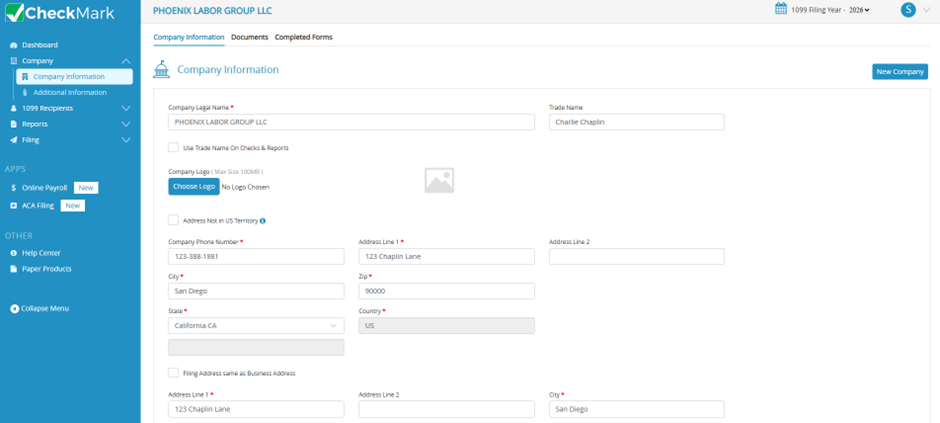
Entering Company Information
- From the left navigation menu, select Company.
- Click Company Information.
- Enter your Company Legal Name and Trade Name (If Applicable).
- (Optional) Click Choose Logo to upload your company logo.
- Enter your company information:
- Federal ID
- Phone Number
- Business Address
- City
- State
- ZIP Code
- If your mailing (filing) address is the same as your business address, select Filing Address Same as Business Address.
- (Optional) Enter the appropriate contact information.
- Click Save.
Your company information is now saved and will automatically populate applicable fields when you create and file 1099 forms.
Additional Information
The Additional Information page contains the payer information that appears on your recipients’ 1099 forms. Most fields are automatically populated from the information entered on the Company Information page, but you can review and update them as needed before creating your forms.
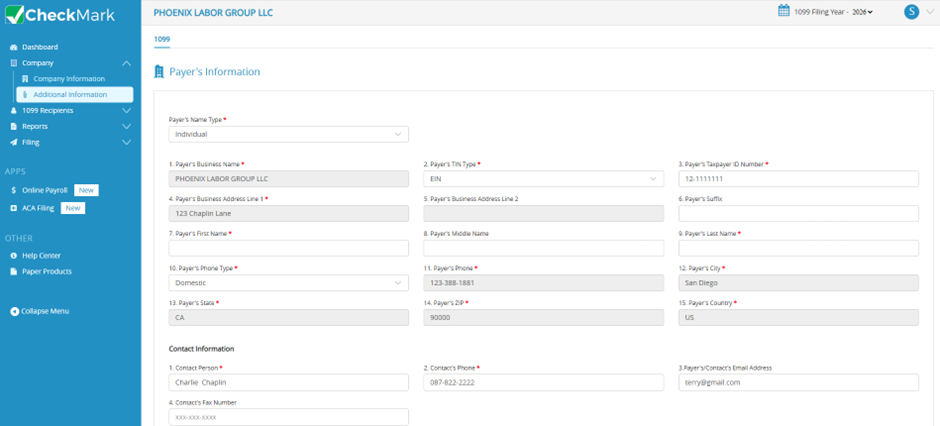
Setting Up Additional Information
- From the left navigation menu, select Company > Additional Information.
- Review the Payer Information displayed on the screen.
- Select the appropriate Payer Name Type:
- Business – Uses your business name as the payer name.
- Individual – Enter the payer’s First Name, Middle Name (optional), and Last Name. These fields are available only when Individual is selected.
- Verify your business address and contact information. This information is automatically copied from the Company Information page. If any information is missing or incorrect, return to Company Information, update the details, and save your changes.
- Complete any remaining fields as required.
- If the payer’s Tax ID is a Social Security Number (SSN), select Tax ID is Social Security Number.
- If applicable, select Combined Fed/State Filing Program.
After you save your changes, the payer information will be used to populate the applicable fields on your recipients’ 1099 forms.
Related Links: